> ## Documentation Index
> Fetch the complete documentation index at: https://docs.decisional.com/llms.txt
> Use this file to discover all available pages before exploring further.
# Inbox
> Give an agent a dedicated email address and review its conversations
## Overview
Inbox gives an agent a dedicated Decisional-managed email address. It is useful when the agent should send from its own identity or receive email threads that can be reviewed from Operator Mode, instead of using a person's Gmail or Outlook mailbox.
 ## Create an inbox
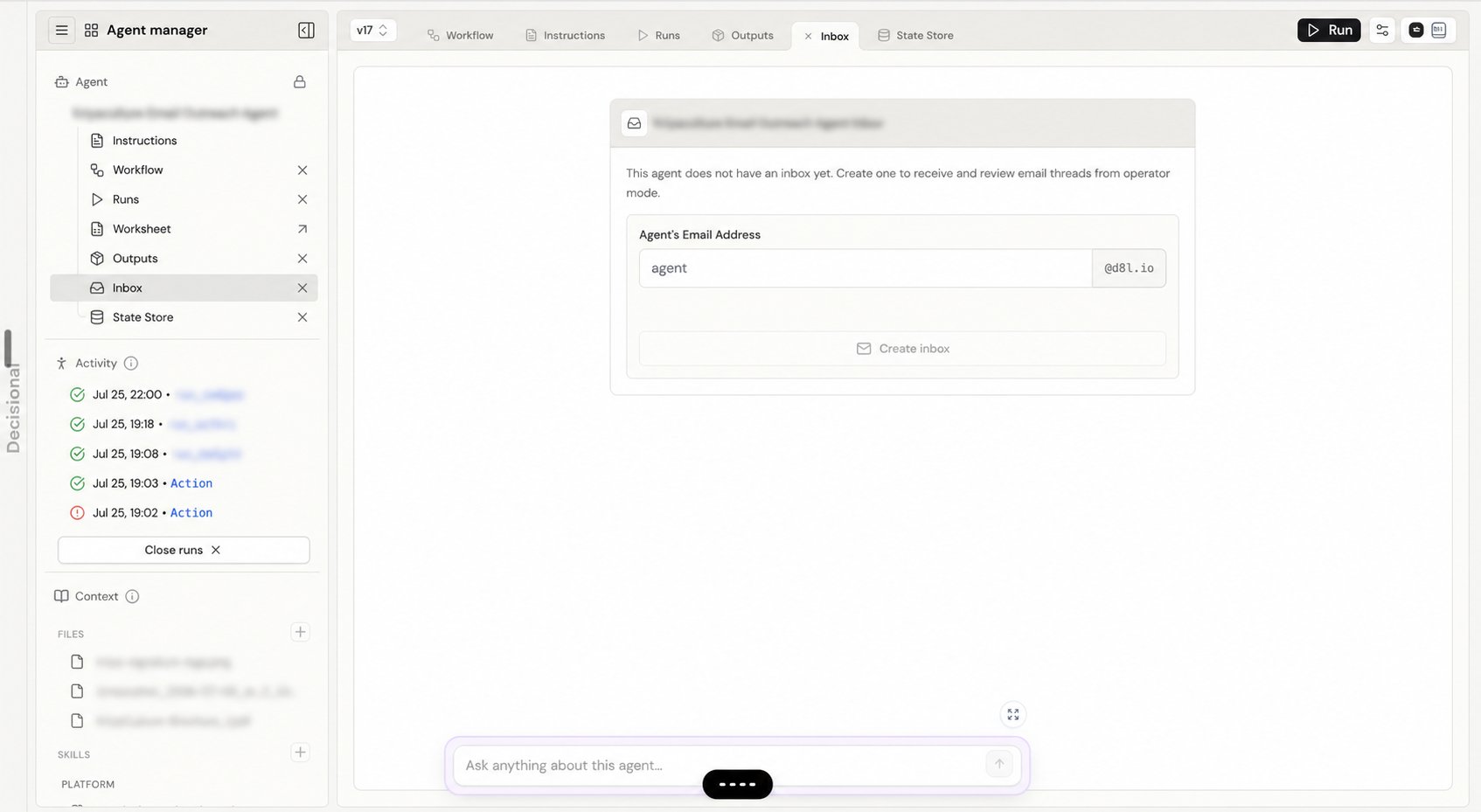
Open **Inbox**, enter a unique name for the address, and wait for Decisional to confirm that it is available. The product adds the displayed email domain.
Select **Create inbox**. The address is attached to this agent and can be copied from the Inbox header.
Add the AgentMail tool when the workflow needs to send from this inbox. An inbox is Decisional-managed and does not require Gmail or Outlook OAuth.
## Review email threads
After messages arrive, Inbox groups them into threads and shows inbound and outbound messages together. Filter the list by **All**, **Received**, **Unread**, or **Sent**. Open a thread to read the full history, inspect attachments, and see message status. New and updated threads appear in real time, and you can also refresh the list manually.
## Manage inbox access
Inbox settings let you enable or disable the address, set its sender policy to **Anyone** or an allowed list, and delete the inbox. Individual threads can also be deleted from the review surface.
Deleting an inbox or email thread is permanent. Confirm that the history is no longer needed before deleting it.
## Related docs
Learn how Inbox fits into the complete agent workspace.
Learn how tools and credentials are connected to an agent.
## Create an inbox
Open **Inbox**, enter a unique name for the address, and wait for Decisional to confirm that it is available. The product adds the displayed email domain.
Select **Create inbox**. The address is attached to this agent and can be copied from the Inbox header.
Add the AgentMail tool when the workflow needs to send from this inbox. An inbox is Decisional-managed and does not require Gmail or Outlook OAuth.
## Review email threads
After messages arrive, Inbox groups them into threads and shows inbound and outbound messages together. Filter the list by **All**, **Received**, **Unread**, or **Sent**. Open a thread to read the full history, inspect attachments, and see message status. New and updated threads appear in real time, and you can also refresh the list manually.
## Manage inbox access
Inbox settings let you enable or disable the address, set its sender policy to **Anyone** or an allowed list, and delete the inbox. Individual threads can also be deleted from the review surface.
Deleting an inbox or email thread is permanent. Confirm that the history is no longer needed before deleting it.
## Related docs
Learn how Inbox fits into the complete agent workspace.
Learn how tools and credentials are connected to an agent.