> ## Documentation Index
> Fetch the complete documentation index at: https://docs.decisional.com/llms.txt
> Use this file to discover all available pages before exploring further.
# Using Dex
> Start work, ask questions, run agents, and review approvals from the web app, Slack, email, or mobile
Dex is Decisional's conversational operator. Use it to ask questions about agents and runs, start one-off work, run agents, view agent details, and review approvals across the tools and context your workspace has authorized.
## What You Can Ask For
Ask about an agent, source, run, file, approval, or output without opening every underlying screen.
Use an agent's available context and connected tools for work that does not need a reusable workflow.
Summarize what happened, identify the step that broke, and surface the relevant logs, files, or outputs.
Start an agent, check its details, or review recent runs without opening every underlying screen.
## Channels
Dex can meet you where the work starts. Use it in the web app for full context, in Slack for team chat, over email for asynchronous requests and updates, and on mobile when you need to review or respond away from your desk.
Start new work, inspect runs, review files, and open the Decisional web app when configuration needs to change.
Chat with Dex from team conversations, ask for updates, and keep work moving without leaving the thread where the request started.
Send requests, receive summaries, and handle asynchronous follow-ups through email when a workflow needs a written trail.
Review updates, answer questions, and approve next steps from the same connected chat surfaces on your phone.
## Approval requests
When you ask Dex to perform a write action from Slack, such as creating a Linear issue, Dex can post an approval request before the action runs. The request summarizes the action, shows the app or record involved, includes an approval link, and keeps the review in the same thread as the original ask.
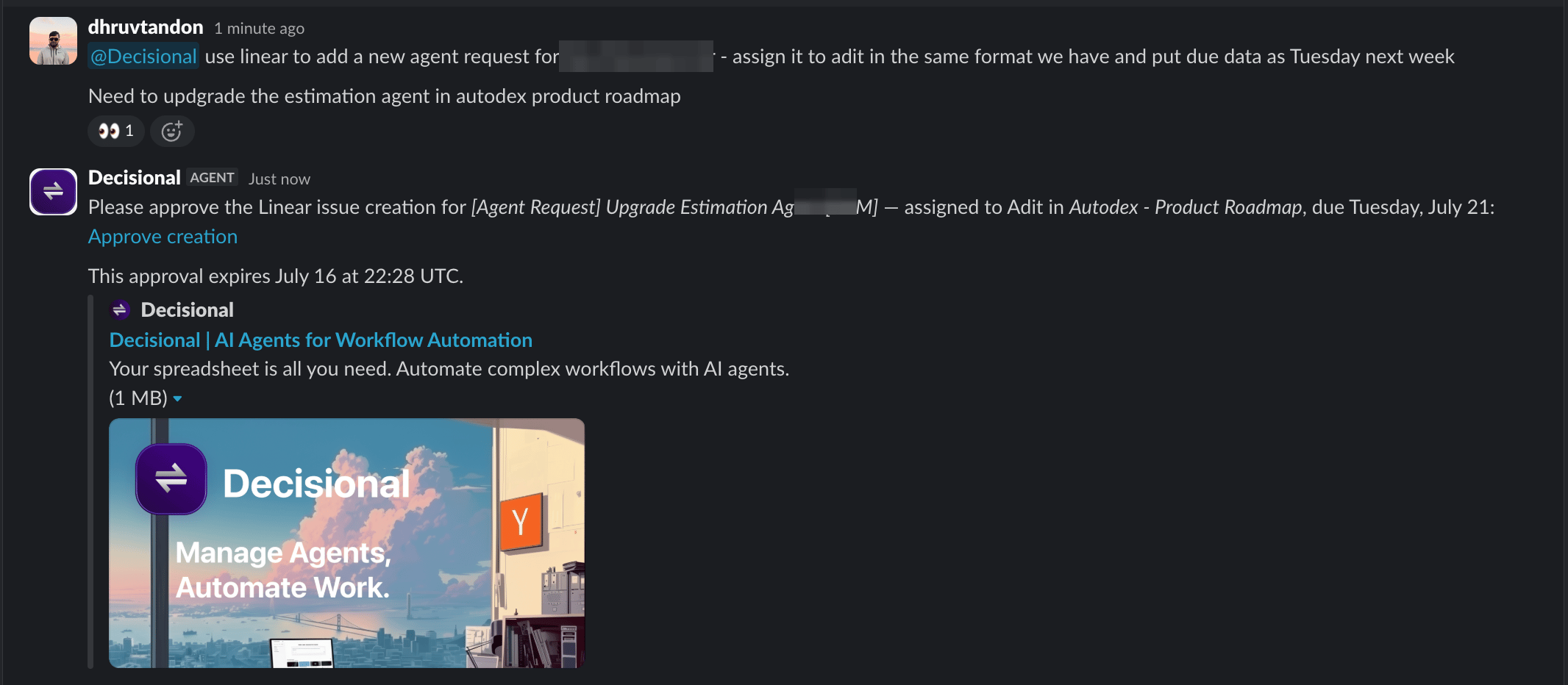 In this example, Dex waits to create the Linear issue until someone selects **Approve creation**. The expiration timestamp limits how long the approval link can be used, and the thread keeps the request, approval, and resulting artifact together.
Learn how ask, bypass, and tool policies control agent actions.
## Relationship to Agents
Dex is where you ask for work and review what happened. Agents are saved automations with their own instructions, connected tools, schedules, files, run history, and approval settings.
Use Dex to run an agent or inspect its details and runs. For configuration changes, Dex points you to the Decisional web app, where you can edit the agent's setup.
## Related docs
Understand Chat Mode, Operator Mode, and Run Mode for agents.
Learn how ask, bypass, and tool policies control agent actions.
In this example, Dex waits to create the Linear issue until someone selects **Approve creation**. The expiration timestamp limits how long the approval link can be used, and the thread keeps the request, approval, and resulting artifact together.
Learn how ask, bypass, and tool policies control agent actions.
## Relationship to Agents
Dex is where you ask for work and review what happened. Agents are saved automations with their own instructions, connected tools, schedules, files, run history, and approval settings.
Use Dex to run an agent or inspect its details and runs. For configuration changes, Dex points you to the Decisional web app, where you can edit the agent's setup.
## Related docs
Understand Chat Mode, Operator Mode, and Run Mode for agents.
Learn how ask, bypass, and tool policies control agent actions.